Borderfolio / Documentation
Borderfolio documentation
Borderfolio is a portfolio tracker for long-term investors whose money crosses borders. You bring in broker statements, and the app separates what you contributed from what markets added, and estimates what fund domicile and your tax residence cost you. This documentation describes the app at app.borderfolio.app as it is built today.
The app at a glance
The top bar has three groups. Overview is the dashboard. Portfolio holds the record of what you own and how it got there: Holdings, Dividends, Contributions, Snapshots and Statements. Insights holds the analysis built on that record: Tax, Independence, Performance and Planner. On the right are the portfolio switcher, notifications and your profile menu.
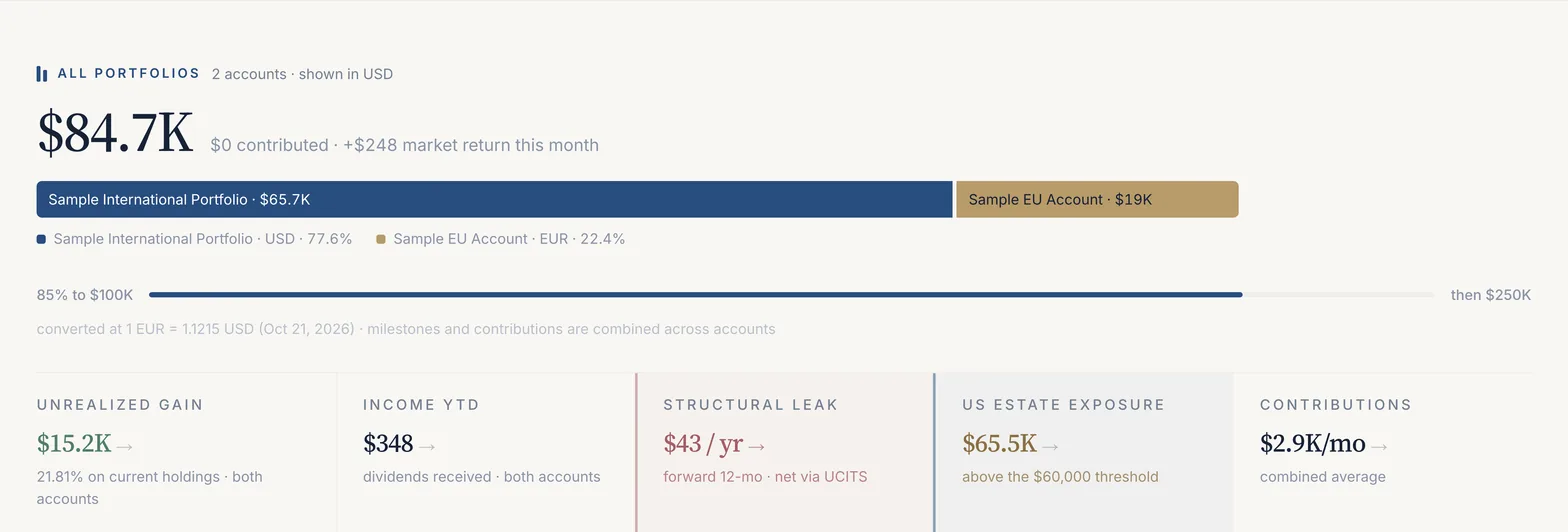
The Overview opens with the portfolio's value and its change this month, split into what you contributed and what the market returned. Below it are five figures (unrealised gain, income so far this year, structural leak, US estate exposure and your contribution pace), then the independence card and the growth trajectory towards the next round-number milestone.
Try it on the sample portfolio
You can open the app without an account at app.borderfolio.app/demo. It creates a private copy of a multi-year sample: a USD Interactive Brokers account with monthly buys since March 2024 and a smaller EUR DEGIRO account whose holdings overlap it. The copy is yours alone and is deleted after 48 hours. Uploads, imports and account changes are switched off in the sample; everything else works, including the Pro-only analysis. Every screenshot in this documentation is taken from it.
How this documentation is organised
- Getting started
- Creating an account, confirming your email and the first-run setup that turns a statement into a portfolio.
- Your portfolio
- Portfolios and holdings, importing statements, connecting a broker, contributions and dividends.
- Insights
- Performance, tax and cross-border analysis, and the planner and independence pages.
- Account
- Residency and settings, plans and limits, and security and your data.
Press ⌘K (or Ctrl K, or /) on any page to search the documentation and the blog.
What the numbers are
Three rules run through the app. Every figure is computed from your own statements, never from a model portfolio. Contributions are kept apart from market returns, so growth you paid for is never shown as performance. And every tax figure is an estimate built on stated assumptions (your residence, the fund's domicile, the treaty rate) for you to check with an adviser, not a filing figure.
The methods behind the figures are written up separately: true return methodology and withholding methodology. Supported markets and currencies are listed on coverage.
Last updated . Describes the app at app.borderfolio.app as built; screenshots are from the sample portfolio. Figures in the app are informational estimates, not tax, legal or investment advice.